• Welcome to AppraisersForum.com, the premier online  community for the discussion of real estate appraisal. Register a free account to be able to post and unlock additional forums and features.

Alamode limiting screen minimization

Status
Not open for further replies.

KYLECODY

Senior Member
Joined
Apr 26, 2003
Professional Status
Certified Residential Appraiser
State
Arizona
After one of the last updates Alamode minimized the amount you can reduce your screen. You could go a full half reduction from top to bottom and now its barely an inch down the screen. I like to have Alamode open on the bottom half of the screen with the internet open on the upper half. Thats how I type. Super easy. I realize many prefer dual monitors but I'm not into it.

Anyways Alamode tried this after an update a few years ago and after many complaints they switched it back to be able to minimize the screens for those that do it my way. If you are one of those, please call Alamode and let them know you want to be able to minimize your screen. Hopefully they will switch that back..again.
 
They also limited how wide you can stretch the side-by-side view. I used to be able to stretch it as wide as I wanted across a pair of monitors. Was something like 12 or 13 comps, now 7.5. All these improvements dreamt up by those who never use the program, without asking anyone how they use it.
 
Not me. I can reduce the vertical to about 3 inches and side by side as wide as the monitor gets.

Try messing with the "zoom" bar at the bottom right of the software.
 
Splitting one screen top and bottom is pretty unusual. Are you using one monitor in portrait mode? If the display is in landscape mode and using only one display it probably makes more sense to split the screen left and right.
 
The zoom bar changes the size of the image within the allowed area, but that allowed area is fixed on my system, both horizontally and vertically.
 
Not me. I seem to have no max and the smallest it will get is like 3 x 6.
 
This is probably too obvious but the only reason I can think of why it would be fixed is that it is maximized. Maybe need to click the "restore down" next to the close button at the top right.
 
I didn't do a recent update though. I think I have done a update once like a year ago. Sucks for you guys if it really is because of update.
 
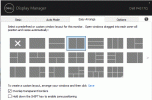
Have you tried Dell Display manager software? It gives you the ability to set up multiple snap-to screens inside of one display. They have pre-programmed ones and you can customize it as well.

Capture.GIF
 

Attachments

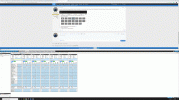
  • Capture2.GIF
    Capture2.GIF
    110.8 KB · Views: 4
Last edited:
This is probably too obvious but the only reason I can think of why it would be fixed is that it is maximized. Maybe need to click the "restore down" next to the close button at the top right.
No, I typically type in full screen, portrait mode, one monitor. When I want to view side by side, I do as you suggest, the drag it across two portrait monitors side by side. A recent updated limited the maximum size of that window.
 
Status
Not open for further replies.
Find a Real Estate Appraiser - Enter Zip Code

Copyright © 2000-, AppraisersForum.com, All Rights Reserved
AppraisersForum.com is proudly hosted by the folks at
AppraiserSites.com
Back
Top