• Welcome to AppraisersForum.com, the premier online  community for the discussion of real estate appraisal. Register a free account to be able to post and unlock additional forums and features.

Sketch and map visually poor

Status
Not open for further replies.

brunge

Sophomore Member
Joined
Aug 24, 2002
Professional Status
Certified Residential Appraiser
State
Virginia
For the last many years my ACI map and ACI sketch and or Apex sketch looks very grainy and pour in the final report. Both look fine in the sketching program or Map program itself but when imported into the report is when it looks bad. Looking back on old reports (years ago) that I did with Apex it looked fine so something has changed with ACI. I’ve been in touch with tech-support and they checked all settings, etc. and they’re supposed to be looking into it, but don’t expect any results anytime soon. curious if anyone else is having the same situation or just me?

I was using the free ACI sketch for a while and change the Apex mainly because of this reason thinking that would fix it but to no avail. Apex is much better but ACI sketch worked fine
 
Sounds like it is being transferred in a reduced file size mode. Try to cut and paste from the original drawing to the sketch page and see if it is better.
 
try making the drawing larger (closer to the edges), or smaller, in the program's drawing box. that size range is pretty wide. grainy is usually to small an image when it is gets enlarged. not enough pixels to fill in the enlarged picture.
in apex you can draw as a stand a lone program, pdf it, then insert it into the appraisal. that may help while they look for the needle in the hay stack.
 
There are plenty of PDF settings related to reducing file size, at some point your PDF driver was probably updated & reset to factory defaults. Try printing one of those old reports that used to look good and see how it looks now, if it doesn't look good now then the issue is most likely related to your PDF driver.
 
I don’t use ACI but I’m pretty sure under “settings “ they have an image optimization tool. It could be that you have it set too strong.
 
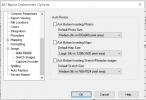
You could be resizing the sketch and map pages to be too small, which would make it appear grainy when stretched to the border of the page. Go to "Options" and then "Environment" and try making them larger. Here is the page under "Options - Sketch" for resizing the sketch, for example:

1628963336996.png
 
I always hit the button in apex to center and fill the screen as a last step. Using the apex outside of ACI and pasting is an option, but not really worth the effort. curious if any else using ACI has the same experience ? Like I mentioned it use to work fine, but that was years ago.
 
Thanks re the settings, I’ll double check, but been through that with tech support several times
 
Are you using previous reports as templates when starting another assignment? I'm probably way off here but if you are using templates that already have photos, maps and a previous sketch embedded in the report, try clearing those "images" first and then go back and import the map and sketch from scratch.
 
Last edited:
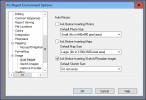
This is how ACI tech support put the settings on my computer.

Templates: Always us a template, however no maps, sketch, or images would be in the report until added.

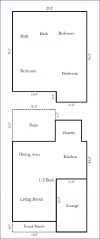
So is it safe to assume that I am unique in the issue? Does your apex sketch have the same crispness of lines and fonts when extracted to the report? sniped an example of how mine looks below, some end up looking worse than this example. They always look perfect in Apex.

1629047148463.png

1629047632902.png
 
Status
Not open for further replies.
Find a Real Estate Appraiser - Enter Zip Code

Copyright © 2000-, AppraisersForum.com, All Rights Reserved
AppraisersForum.com is proudly hosted by the folks at
AppraiserSites.com
Back
Top