• Welcome to AppraisersForum.com, the premier online  community for the discussion of real estate appraisal. Register a free account to be able to post and unlock additional forums and features.

Import Public Records using Total

Status
Not open for further replies.
My issue is that I use a tablet and start my report in the field using a template. When I get to the office and upload it, it does not have a option to use this feature to the best of my knowledge. I haven't had the time to contact Alamode to find a answer.

I also use the "import from MLS text file" from within the tool section. Alamode will help you set it up, but I made additional changes that works with my canned fields in the grid. This is kinda like Datamaster, which is not in my area. Below is a example of how it comes out when downloaded. Saves a lot of time. Click to expand. You can customize the below to your likings.

As for your post, I have most of the data "unclicked" as it messes up my canned grid data (porches, patio, garage, amenities, etc. I use the owners name, legal, APN, prior sales (this can get you into trouble also...realist does not always have the prior sales or most recent sales listed....taxes are a year behind..double check with the county always.

That being said, it saves me 1-3 minutes per report, as I already have the county website open and I usually just copy and paste it. It saves Skippy the "I do not verify" the appraiser a bunch a time as realist is all is needed (MLS agent uses realist, so it is not really verifying anything.


View attachment 50564
If you're using Total for Mobile on tablet -- and you utilize a template to begin a rpt in field -- this is what you need to do to import into TOTAL:
- upload rpt from tablet to cloud / sync
- then on your desktop, open the same base "template"
- click "Dashboard" button on top right of Total rpt window
- under Total for Mobile Sync, click DOWNLOAD
- box opens up... select to the opened template file to merge your data into (since it's the same base file -- should merge seamlessly)
- then, all you need to do is SAVE AS (new file & rename...) so that you don't overright orig template file on your desktop
- if you have fields linked thru excel sheet and you've populated fields with data in the field... you might get a message to choose whether or not to UNLINK fields... which you choose YES

The key is having links / data import setup in both template versions - the one on your desktop & tablet; what I recommend is creating a base template on your desktop, then upload to your tablet (via Dashboard/Total for Mobile sync) and then use this uploaded template as your 'base template' in the field... bc when you upload/download back to deskptop... all field will be matched, etc. with no issues

Hope this helps!
 
If you're using Total for Mobile on tablet -- and you utilize a template to begin a rpt in field -- this is what you need to do to import into TOTAL:
- upload rpt from tablet to cloud / sync
- then on your desktop, open the same base "template"
- click "Dashboard" button on top right of Total rpt window
- under Total for Mobile Sync, click DOWNLOAD
- box opens up... select to the opened template file to merge your data into (since it's the same base file -- should merge seamlessly)
- then, all you need to do is SAVE AS (new file & rename...) so that you don't overright orig template file on your desktop
- if you have fields linked thru excel sheet and you've populated fields with data in the field... you might get a message to choose whether or not to UNLINK fields... which you choose YES

The key is having links / data import setup in both template versions - the one on your desktop & tablet; what I recommend is creating a base template on your desktop, then upload to your tablet (via Dashboard/Total for Mobile sync) and then use this uploaded template as your 'base template' in the field... bc when you upload/download back to deskptop... all field will be matched, etc. with no issues

Hope this helps!
Thanks.

That is basically how mine is set up.
I have a template for each and every client on my tablet. Each template is set up to meet the known stips and requirements for each client.

When I get back to the office, I go to the Dashboard, hit download, and then hit the "create new report" option. Then import.
Now I can go to the data tab and hit the subject property data launch. (this is the option of this thread).

Now when I have my comps, go to tools, import from MLS text file.

The only thing that I do not have imported is the prior sale history of the comparable sales. Datamaster is not available in my area. This would be a big help if this feature would become available.

PS, New trick for your tablet. I use the floating keyboard and I put it in the middle. Now my "quick lists" are much more scrollable. The full key board blocks the majority of the quick list (takes a longer time to scroll and find what I am looking for)....wish I knew that function a long time age.
 
Thanks.

That is basically how mine is set up.
I have a template for each and every client on my tablet. Each template is set up to meet the known stips and requirements for each client.

When I get back to the office, I go to the Dashboard, hit download, and then hit the "create new report" option. Then import.
Now I can go to the data tab and hit the subject property data launch. (this is the option of this thread).

Now when I have my comps, go to tools, import from MLS text file.

The only thing that I do not have imported is the prior sale history of the comparable sales. Datamaster is not available in my area. This would be a big help if this feature would become available.

PS, New trick for your tablet. I use the floating keyboard and I put it in the middle. Now my "quick lists" are much more scrollable. The full key board blocks the majority of the quick list (takes a longer time to scroll and find what I am looking for)....wish I knew that function a long time age.
Thx for input; how do you do floating keyboard on Ipad?
 
Thx for input; how do you do floating keyboard on Ipad?
Sorry, but I use the new tabs7+.

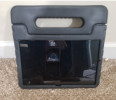
But I will share my tablet case.

This is for ipads https://www.amazon.com/dp/B07Y8C1P8B/?tag=realestatappraat

I took my old tablet out and it looked brand new. I have dropped it, etc. I did have to modify.

Also take a look at my pics. I added a low profile clipboard that clips to vinyl sided homes, and I can lay it on the ground if need be. I use a pearl or a white one, easier to see.

click to expand. makes taking pics and measuring so much easier. I often use the case for a target. Use Velcro.
1612296149982.png

1612296175206.png
 
Status
Not open for further replies.
Find a Real Estate Appraiser - Enter Zip Code

Copyright © 2000-, AppraisersForum.com, All Rights Reserved
AppraisersForum.com is proudly hosted by the folks at
AppraiserSites.com
Back
Top