• Welcome to AppraisersForum.com, the premier online  community for the discussion of real estate appraisal. Register a free account to be able to post and unlock additional forums and features.

Windows Tablets For Fieldwork

BTW, and FWIW, I read via the article linked below that Amazon has the 2024 Surface Pro with 13" screen, 16GB RAM and 256 GB nVME storage (easily user upgradeable) on sale for $899 TODAY if you have an Amazon Prime account. Note that this device uses the Snapdragon X Elite. In my experience (and remember I am no longer an active Real Estate Appraiser running "Full Suite Appraisal software" which can be bloated IMHO) so I understand some may be skeptical of whether this can run their software. Based on my own experiences running such software adequately (all factors considered) on earlier devices with lesser CPU editions, I would think the newer upper end Snapdragon X Elite CPUs should perform very well for a light Windows Tablet.

So, how would you be able to find out how it handles your particular workload?

As most of you know, Amazon allows for full price refunds for 30 days for typical devices such as this if they are not damaged, etc. So, if you really want to "try before you buy" and are willing to follow the rules and spend the time loading up your software and representative data, etc., you can give it a whirl and see if this device fills a niche for you. Lately, I have been taking advantage of this policy whenever I am curious enough to (temporarily?) fork out the dough via credit card, patiently wait overnight (LOL), respectfully unwrap and store the original packaging, load things up in a manner representative of my expected usage and then put it though it's paces. IF it satisfies enough, I'll probably keep it. If not, I wrap it up, go to Amazon and fill out the refund request, print the label, etc., etc., etc. and then drop it off at a local UPS store. If I was still living "way out in the sticks, I'd pay the small price to have UPS come pick it up. Easy, IMHO. Note that I don't do this "willy-nilly" - even though I am retired now, my time is still very valuable to me, so I only do this when going to a local shop (i.e. Best Buy, or similar) isn't really appropriate - e.g. they obviously won't let you load up a device with your own data and then walk around outside long enough to really test it...

The 2024 Surface Pro may not fit your particular needs/desires, and we already know that they have announced even faster Snapdragon CPUs due soon, but they will obviously be much more expensive, so I'm posting this "try before you buy" recommendation for those who are curious enough to see if it might be a BB4TB (Best Bang For The Buck) device.

Article: https://www.windowscentral.com/hard...ss-than-an-ipad-pro-only-for-amazon-prime-day

Purchase Link: https://www.amazon.com/dp/B0CXKXNNPX?tag=realestatappraat


[Edit] I forgot to mention that the smaller 12" version in "Platinum" color (which FWIW, I personally prefer over Black, which get warmer in TX) with the "regular" Snapdragon X Plus (Article and Purchase links below) for $649 TODAY if you have an Amazon Prima account. Of course, it is somewhat lighter, the CPU is not clocked as high, and the storage is the slower UFS variety, but when I tested this model against my earlier Snapdragon devices, it handily outran them when running regular appraisal apps "back in the day." The model with a 512 GB SSD is $848.88 but only you can decide if it is worth the upcharge... (Old "pack rat appraiser" habits die hard, LOL.)

Article: https://www.windowscentral.com/hard...t-price-ever-just-usd649-for-amazon-prime-day

Purchase Link: https://www.amazon.com/dp/B0DZ4NT67T?tag=realestatappraat


Hope this helps!


+Randall Garrett+
TX

[PS] - Sorry to make this post so long, but I thought I'd point to an article from June, 2025 regarding a "Final" review of the Surface Pro 12 in which the author correctly (IMHO) points out some of his observations after doing more extensive testing. If you are interested in either of the two items above, I believe the points made should be considered before making a purchase.

Article: https://www.windowscentral.com/hardware/surface-pro/surface-pro-12inch-review-2025

/end/
 
Last edited:
Surfacebook that can run full Windows is great (wife loves hers). But skip the Surface tablet and get an iPad with LiDar (software written for iOS is an order of magnitude better than anything for Windows tablet or Android tablet). Price/cost is really not that important for these types of devices - capabilities are.
 
I do not agree with the opinions stated above as if they were fact, but I'll touch on that later...

[Please note - Folks are, of course, welcome to their opinions as well as constructive criticism but this thread focuses on Windows Tablets and "2-in-1's" suitable for people who want to run their full suite of Windows-based appraisal software while in the field.]

"Back in the day" I polled the users here whether or not we should expand into Android and iOS devices, and the result was "No." Since the use of non-Windows devices has risen so dramatically, would folks like to jump into a thread here on AF with a thread similar to this one (focused on Android/iOS devices) or maybe just add them to this thread? It is already the most widely visited thread on this sub-forum, and in the past I've been able to request a name change to keep the title better focused, so I'd imagine Wayne (or whomever it is now) would agree. Nobody really goes back to the early posts - we all just look at the most current, so I see no barrier to user convenience with such a change. Perhaps we should start a new thread? Should I do a formal poll here?

Let me know your thoughts. My sole goal is to help provide information which suits your needs.


+Randall Garrett+
TX
/end/
 
I do not agree with the opinions stated above as if they were fact, but I'll touch on that later...

[Please note - Folks are, of course, welcome to their opinions as well as constructive criticism but this thread focuses on Windows Tablets and "2-in-1's" suitable for people who want to run their full suite of Windows-based appraisal software while in the field.]

"Back in the day" I polled the users here whether or not we should expand into Android and iOS devices, and the result was "No." Since the use of non-Windows devices has risen so dramatically, would folks like to jump into a thread here on AF with a thread similar to this one (focused on Android/iOS devices) or maybe just add them to this thread? It is already the most widely visited thread on this sub-forum, and in the past I've been able to request a name change to keep the title better focused, so I'd imagine Wayne (or whomever it is now) would agree. Nobody really goes back to the early posts - we all just look at the most current, so I see no barrier to user convenience with such a change. Perhaps we should start a new thread? Should I do a formal poll here?

Let me know your thoughts. My sole goal is to help provide information which suits your needs.


+Randall Garrett+
TX
/end/
Keep in mind that all the upcoming site inspection apps are going to be optimized for Apple iOS devices which have superior chips for AI and really well integrated LiDar.
 
Last edited:
Keep in mind that all the upcoming site inspection apps are going to be optimized for Apple iOS devices which have superior chips for AI and really well integrated LiDar.
Thanks! Yes, I have been and are still personally & professionally well versed in that, but it still does not change the fact that this is (presently) a Windows Field Devices thread, and that the LiDar functionality (presumably for sketching/area calculation, etc.) is critical is your opinion, not fact.

It is my opinion that it's not all that great and if it is real interest here I'll get into that later. If you and or others think differently, that's fine, but again these are opinions, not facts and are not the subject of this thread.
No offense meant. :peace:

+Randall Garrett+
TX
/end/
 
Thanks! Yes, I have been and are still personally & professionally well versed in that, but it still does not change the fact that this is (presently) a Windows Field Devices thread, and that the LiDar functionality (presumably for sketching/area calculation, etc.) is critical is your opinion, not fact.

It is my opinion that it's not all that great and if it is real interest here I'll get into that later. If you and or others think differently, that's fine, but again these are opinions, not facts and are not the subject of this thread.
No offense meant. :peace:

+Randall Garrett+
TX
/end/

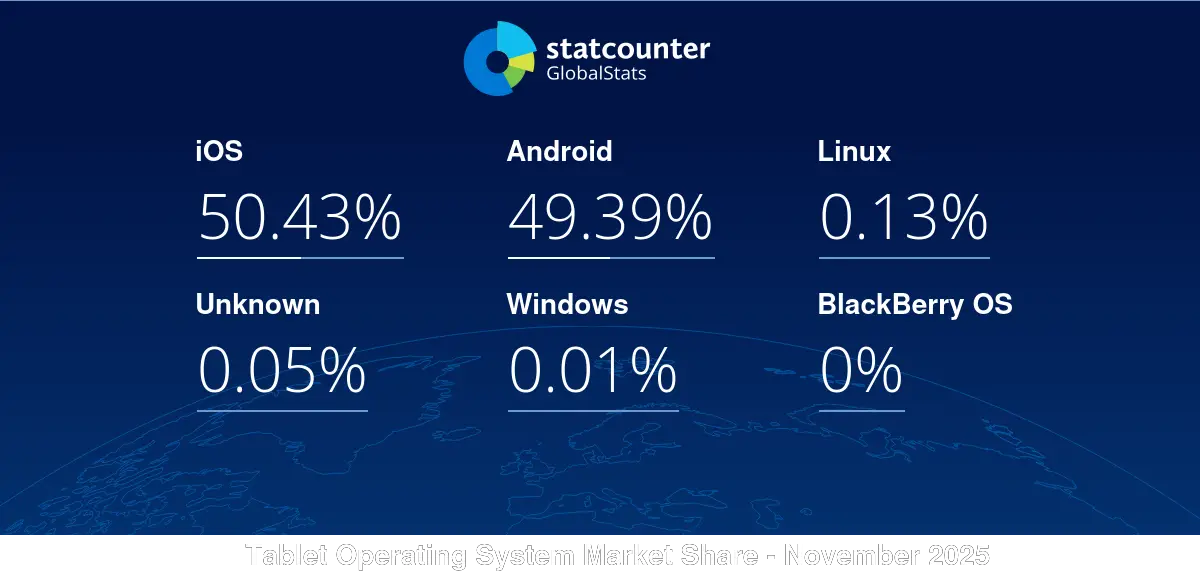
The initial question here was from 2012. A lot has changed since. Windows tablets have gone from 7.5% market share in 2013 to 0.01% in 2025. Currently IOS is at 50.45% with Android right behind at 49.37%.


Windows tablets appear to be going the way of the Dodo
 
Windows tablets appear to be going the way of the Dodo
Yep, we bought one - they (Android tablets) are hot garbage. The software written for them is generally half-assed and atrocious vs iOS (not talking about the underlying OS, but 3rd party apps)
 
Last edited:
Sorry for being AWOL lately - we've been off on another "Internet unfriendly" adventure for a bit, but I should be back at my desk in about a week or so.

After watching a few reviews from CES (which I did not attend this year), I was interested in seeing for myself how the new Snapdragon and "Panther Lake" devices performed. I was able to catch up with a former contact with much better connections than I have. Sha happened to have a single example of each, and while this was before embargos were lifter, she allowed me to run a few benchmarks that I have come to rely on for simulating a workload resembling what I remember being representative of an appraiser/field inspector. I'll wait to get my hands on the exact models that interest me both to give out details, but what I can say is that I was pleasantly surprised by both devices – they both performed betteer than I had anticipated and neither one of them were the top end models of either CPU/GPU combo. Neither were "gamer builds" and were running 16 - 32 GB RAM and Gen 4 m.2 NVMe drives. FWIW, I'm now debating with myself on whether I really "need" something with a DGPU. Of course, what I do now mainly involves activities not directly associated with the Appraisal business and I would not have been allowed to install any Appraisal packages, if I had even had any. I've been around this stuff from both the inside and outside perspectives for long enough, however, to confidently suggest that most regular appraisers here should take a look before purchasing something from "last year's" stock. That said, I would wait at least a couple more months to let things settle down, avoid the "early adopter' phase, etc. before parting with hard earned dough. You might be surprised how the build quality, weight and performance has noticeably improved in (say) the last 12 - 18 months, not to mention if it's been several years since you looked.

More specifics once I make a purchase decision and take delivery. Since this is a "Tablet PC" thread, I'll pay special attention to those devices, but I'll likely do some version of a 2-in-1 for my current "needs"... I'll be mainly back in TX until mid-August when we leave for our next Baltic/Northern Europe/Arctic trip.

I'm still looking for any device which has a performant outdoor readable screen. I'm currently following a couple of devices with "MIP" screens which perform very well IMHO in both indoor and outdoor conditions. The main limiting factor is that they mostly use Android, not Windows. One manufacturer is telling me that if there is enough demand, they could "do Windows" but I'm calling that a long shot <sigh> and I can't blame them...

Hope this helps for now!

+Randall Garrett+
/end/
 
I ended up purchasing a 2 in 1. I went for a larger unit. HP no longer had larger units on the site while I was looking right before Christmas. Ended up buying off Amazon at a significantly discounted rate, although probably got what I paid for. HP Spectre x360 2-in-1 16t. I7 Ultra 155H 3800MHz 16 cores. 32 GIG ram, 2tb drive space. I am not sure what my HD speed is nor am I sure about the graphics card, but the tech at my appraisal software provider stated it was a little light.
First the positives. I am coming off a 5 year run with an HP x360 14inch. Prior to that were lenovo X1 3:2 14" screen with kickstand, then lenovo p?31,51 something 2-in-1 had a widescreen 14', was setup to do a lot of 3d rendering. Windows surface Book prior to that, and Lenovo X61s prior to that.
First, the positives. I have really liked the added screen real estate both while traveling and in the field. I can place the URAR at the top of screen in portrait mode and sketch window below and have good visibility for editing. The screen is viewable in full sunlight but would crank up brightness to 100% for extended periods. I keep at around 60% for typical day. Unit still fits in my older backpack used with old spectre and is a little large for my truck mount, but with some modification I think will work fine. The pen is magnetic and does fall off site frequently, but in portrait mode while in field fits on back in a metal area with top sticking up just above top of screen and is more secure. Keyboard is average with backlighting when needed and has large touchpad. The additional drive space has been nice as I have not had to utilize external storage for files. Everything fits on this device. The device itself seems more robust than my older one which was a worry, as I had to replace the screen on the old device 3 times due to cracks. The older unit was pretty fragile. The newer unit has much more secure screen and less flimsy.
Now the negatives. The screen is bulkier and heavy for inspections. Have to be more careful getting in and out of tighter spaces. I knew the weight would be heavier and was willing to trade off the extra screen real estate for the weight. The added size and weight does however allow a better grip on the unit when doing field inspections.
I had hoped that the new unit would alleviate some issues I was having with the older 5 year old unit, but really has not. In fact, had created a new issue with printer spooling that I have never had prior. The old unit had two major issues and the new one does as well. 1, When moving a window in the appraisal software somewhere else on the screen, everything freezes until the window is moved and it takes up to 20 seconds for this to happen, even when done by accident. 2. This is a new issue on this unit, Randomly in the appraisal software, when clicking buttons to save file, sign report, etc. It will take up to 25 seconds for the action to be performed. You can literally click the button 15-20 times while nothing seems to be happening before the action happens and the screen clears. 3 and this is probably the most frustrating, While typing a reconciliation or any kind of paragraph, something gets hit, not sure if I am accidentally hitting the touch pad or arrow or what, but while I am still typing, large portions of the paragraph will highlight in blue and will be erased while I am still typing. It happened 4 times while writing this post. Had this same issue with older unit as well.
In short, while I still have some issue to figure out, I am overall happy, particularly based on the price of this unit as compared to my prior unit and screen size is a real plus for me even with the trade-offs.
 
Find a Real Estate Appraiser - Enter Zip Code

Copyright © 2000-, AppraisersForum.com, All Rights Reserved
AppraisersForum.com is proudly hosted by the folks at
AppraiserSites.com
Back
Top